⚔️ TJ Liquidity Battle
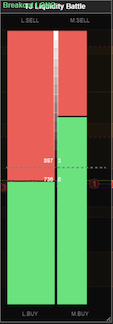
Visualizes the conflict between Aggressive Flow (Market Orders) and Passive Liquidity (Limit Orders) using a physics-based Impact/Decay model.
 **
**
🚀 Overview
Standard volume indicators show you what happened in the past. Liquidity Battle shows you the current pressure in the market.
It treats market volume as "Energy" and liquidity as a "Wall." * Aggressive Flow (The Attack): Market orders add energy to the flow bars. This energy "decays" over time, mimicking the fading momentum of a trade. * Passive Liquidity (The Defense): Limit orders create a wall. When trades hit, the wall shrinks (consumption). When algos reload, the wall grows. * The Piston (The Result): A central bar that moves based on actual price displacement, showing who is actually winning the ground war.
✨ Key Features
- Physics Engine: Uses an "Impact & Decay" model (like a VU meter) instead of arbitrary time windows. Big trades cause instant, massive spikes.
- Pattern Recognition: Automatically detects and alerts you to 5 institutional order flow patterns (Absorption, Spoofing, Breakouts, etc.).
- Dynamic Scaling: Auto-calibrates to current volatility (ATR) so bars never look "flat" or "clipped."
- Dual Layouts: Choose between
Two-Bar Split(classic fight) orThree-Bar Centralviews.
🧠 Pattern Recognition Guide
The indicator automatically analyzes the relationship between Flow, Liquidity, and Price to detect these market states:
| Pattern | Signal | Description | Meaning |
|---|---|---|---|
| BREAKOUT | 🟢/🔴 | High Flow + Liquidity Collapsing + Price Moving | Continuation. The attackers have broken the wall. |
| ABSORPTION | ⚠️ | High Flow + Strong Liquidity + Price Stuck | Reversal Risk. A hidden buyer/seller is absorbing all aggression. |
| SPOOF | 👻 | Liquidity Collapses without Flow | Fakeout. Someone pulled their limit orders to trick you. |
| VACUUM | 💨 | Price Moves fast with Low Flow & Low Liquidity | Volatility. Price is slipping through empty pockets. |
| EXHAUSTION | 📉 | Flow Spikes then immediately Decays | Pullback. The attackers ran out of ammo. |
⚙️ Settings Guide
1. Physics & Animation
- Calculation Mode:
Separated: Reacts instantly to every single tick. (Smoothest)Cumulative: Syncs with ATAS Order Flow bubbles.
- Min Trade Size: Filters out noise. Only trades > N lots will add energy to the bars.
- Flow Decay Speed: Controls how fast the "energy" fades.
0.99: Slow fade (Memory effect).0.85: Fast fade (Instant reaction).
- Refresh Rate: Default
100ms. Lower values = smoother 60fps animation but higher CPU usage.
2. Pattern Recognition
- Absorption Threshold: Sensitivity for detecting "Brick Walls." Higher (0.8+) means it only alerts on massive absorption.
- Alerts: Enable sound/popup alerts when a pattern is found.
3. Layout
- Midpoint Behavior:
Frozen: Center is always fixed.Unfrozen: Center floats based on the ratio of Buy vs Sell pressure.
- Piston Width: Thickness of the central price displacement bar.
📥 Installation
- Download the
.csfile or.dll. - Place it in your ATAS
Documents/ATAS/Indicators/folder. - Restart ATAS.
- Open a chart, press
Ctrl+I, and search for TJ Liquidity Battle.
⚠️ Disclaimer
Trading futures and derivatives involves significant risk of loss and is not suitable for all investors. This tool is for educational and visualization purposes only.